SWAT+ model generation · United States
Order a SWAT+ model. Get a package you can open and run.
Pick a USGS gage, a HUC12 outlet, or a whole HUC8. SWATGenX clips the national terrain, soils, land cover and climate, delineates the network from NHDPlus HR, builds the HRUs, and returns a complete SWAT+ project — QGIS database, text inputs, generated weather, and a verification run already done.
No desktop GIS, no QGIS install, no code required — and a REST API plus MCP server if you would rather not click at all.
Ordering one, in the actual interface
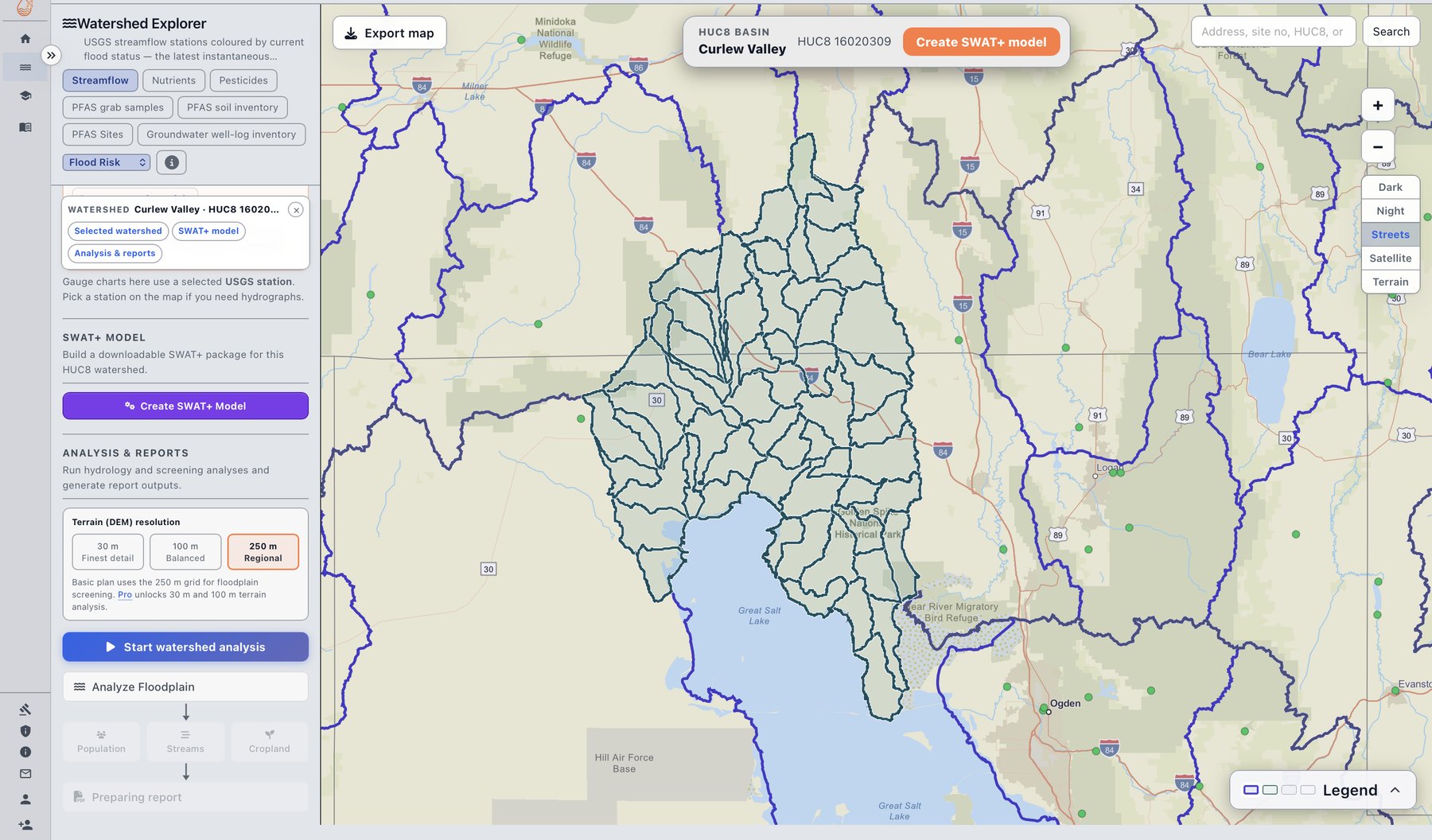
Not a diagram of the flow — the flow. Both of these are screenshots of the live site, and the dialog tells you what it is about to do before it does it: which model type, which grids, how channels are routed, and roughly how long the build takes.
What is actually in the package
A complete SWAT+ project, not a folder of intermediate rasters and not just output tables. The tree below is a real completed build for USGS 01012515 — 291 files in TxtInOut, the QGIS project database, per-station generated weather series, NetCDF output from the verification run, and a manifest recording which inputs produced it.
SWATGenX_v1/
├── SWATGenX_v1.sqlite          QGIS project database
├── build_manifest.json         what was built, from which inputs
├── provenance.json             data lineage for every layer
├── Watershed/
│   ├── Rasters/                clipped DEM, land use, soils
│   ├── Shapes/                 subbasins, HRUs, rivers, aquifers
│   └── Text/
├── Scenarios/Default/
│   ├── TxtInOut/               291 SWAT+ input files
│   │   ├── file.cio  codes.bsn  time.sim
│   │   ├── hru.hru   channel.cha  aquifer.aqu
│   │   ├── soils.sol landuse.lum  field.fld
│   │   ├── r74_c1345.pcp/.tmp/.hmd/.slr/.wnd
│   │   └── channel_sd_day.nc   NetCDF output
│   └── Results/                shapefiles + output SQLite
└── streamflow_data/            observed USGS record
Contents of one real build; total size and file counts vary with watershed size (this one is ~71 MB unpacked, ~20 MB zipped).
Three ways to define the basin
Every order starts by defining a drainage basin, represented as a set of one or more WBD HUC12 polygons. NHDPlus HR catchments inside that basin build the landscape units (HRUs) and connect them to the routed stream network.
| Entry point | What you choose | How SWATGenX turns that into a basin |
|---|---|---|
| USGS station (gage) | A USGS site number | The station is looked up in the platform’s station table and its precomputed list of upstream HUC12s becomes the drainage basin for that gage’s outlet. |
| Catalog outlet (HUC12) | An outlet HUC12 in Watershed Explorer | An upstream walk from the selected outlet gathers every upstream HUC12 draining to it (with safety limits on very large watersheds). |
| Whole basin (HUC8) | An entire HUC8 subbasin | The basin is derived as the HUC12s falling within that HUC8, and the package is assembled for the whole subbasin footprint. |
Prepared and waiting across CONUS: 87,387 HUC12 catalog polygons, 2,246 HUC8 subbasins, 24,750,692 NHDPlus HR flowlines and 24,833,258 catchments across 233 VPUIDs.
Watch: SWATGenX in 100 seconds
SWATGenX changes where you start. Choose a stream gauge or a watershed anywhere in the lower forty-eight states, and we build a complete, ready-to-run SWAT+ model for it from national data, usually within a couple of hours.
Plays from swatgenx.com, with captions.
Or order it from code
The same job the button triggers is a documented REST call — order, poll, download. There is also a public MCP server, so an AI agent can order and retrieve a model without a browser.
import os, requests

headers = {"Authorization": f"Bearer {os.environ['SWATGENX_API_KEY']}",
           "Content-Type": "application/json"}

# a 12-digit WBD outlet HUC12, exactly as picked in Watershed Explorer
r = requests.post(
    "https://www.swatgenx.com/api/model-settings/explorer-watershed",
    headers=headers,
    json={"outlet_huc12": "070500020602",
          "ls_resolution": 250,
          "dem_resolution": 30},
    timeout=120,
)
print(r.json()) # -> task id; poll /api/task_status/<task_id>Or let an AI assistant do it
SWATGenX runs a public MCP server, so an assistant that supports connectors can talk to the platform directly — search models, read calibration results, query the national groundwater and PFAS data, preview a build, and order one. You connect it once by pointing the client at https://www.swatgenx.com/mcp, then choose which tools it may use.
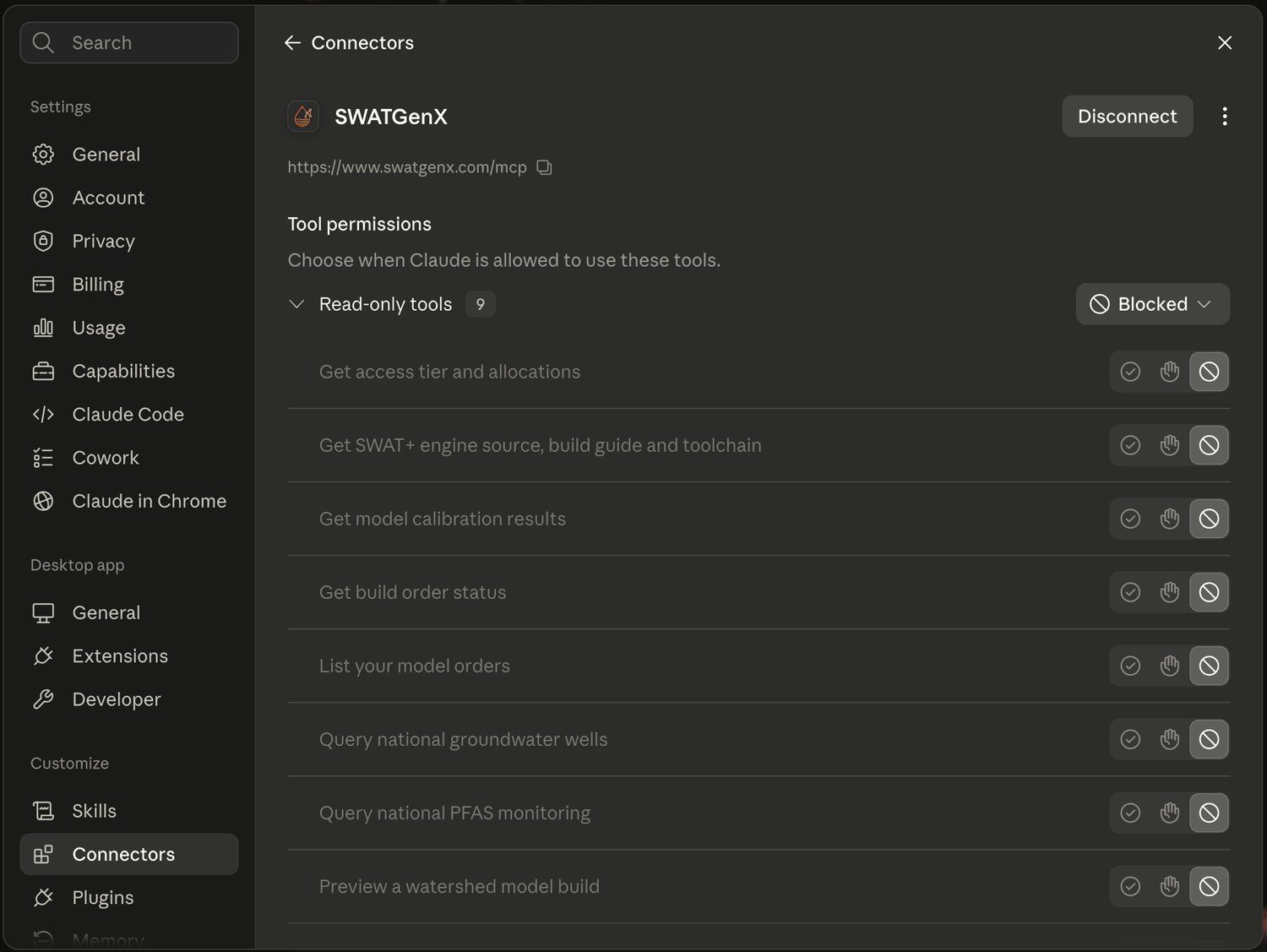
SWATGenX connected as an MCP connector. Each tool carries its own permission, so read-only access and model ordering are separate decisions — you are not handing over blanket access.
What you are getting, stated plainly
Downloads are automated SWAT+ setups for your review and calibration—not “finished” calibrated models unless you complete that workflow separately.
Every build auto-runs a 10-year verification simulation and a SWAT+ Check screening report, so you can see how the model behaves before committing time to it. Calibration is a separate, optional step with its own queue and estimate — how calibration works.