Why SWAT+ model setup is difficult
SWAT+ (SWAT Plus) is powerful. Setting it up correctly is the hard part.
SWAT+ can support serious watershed hydrology, water balance, sediment, nutrient, and management studies — but before a model can run, hydrography, terrain, soils, land cover, weather, subbasins, HRUs, routing tables, and SWAT+ Editor inputs must form one consistent project. That preparation layer is where many projects fail.
What SWATGenX delivers is an uncalibrated model: it ranks and localises where to look and scopes the problem — triage, not design certification. Calibrate against observations before relying on the magnitudes it reports.
Most SWAT+ problems are not caused by the SWAT+ engine itself. They come from the preparation layer around it: GIS delineation, stream-network preparation, HRU creation, climate formatting, SWAT+ Editor configuration, and simulation checks — each step depending on the one before it.
A small error in projection, topology, outlet selection, stream routing, or missing input files can break the model before the first simulation begins. That is why manual SWAT+ setup often takes days or weeks, especially when using high-resolution national datasets such as NHDPlus-HR, gSSURGO, NLCD, PRISM, and DEM products.
SWATGenX was built to automate this preparation layer so teams reach inspectable SWAT+ packages faster, with the same choke points checked in software instead of discovered late in a desktop folder.
SWAT+ setup is not one task — it is a chain of fragile tasks
A typical manual SWAT+ workflow chains the kinds of steps below. Each tool uses its own files, folders, assumptions, and naming conventions.
QSWAT+ may appear to finish, but if required shapefiles are missing or incomplete, SWAT+ Editor may fail later. Editor may save a project, but the simulation can still fail when weather files, routing tables, or HRU definitions are inconsistent.
That is why the workflow feels difficult: the failure often appears far downstream from the original mistake.
- Preparing DEM, stream, soil, land-use, and weather datasets
- Delineating watersheds and channels in QGIS / QSWAT+
- Defining subbasins, LSUs, HRUs, and routing connections
- Importing the project into SWAT+ Editor
- Generating TxtInOut and running SWAT+
- Verifying that the simulation completed successfully
National datasets are authoritative, but not automatically SWAT+ ready
Public datasets are built for broad scientific and planning use. They are not delivered as ready-made SWAT+ projects.
NHDPlus-HR provides high-resolution hydrography, catchments, and flowline attributes — but SWAT+ still needs a clean routing structure. Catchments, flowlines, outlets, lakes, and subbasins must be converted into a form the engine can consume.
- Catchments that do not map cleanly to flowlines
- Divergent or ambiguous flow paths
- Lake and reservoir routing complications
- Subbasins with more than one outlet
- Mismatched coordinate reference systems
- Stream networks that do not align cleanly with the DEM
- Missing or inconsistent attributes needed for routing
None of these mean the source data is wrong. They mean the data must be transformed into a model-ready structure — and that transformation is one of the hardest parts of SWAT+ setup.
NHDPlus-HR adds detail — and setup complexity
High-resolution hydrography captures more channels, lakes, catchments, and drainage detail. More detail also means more topology to clean, more routing relationships to verify, and more chances for a subtle inconsistency to break the build.
A watershed built with coarse hydrography may have fewer segments and simpler routing. One built with NHDPlus-HR may include thousands of channels, many lakes, and many small catchments — scientifically useful, but harder to prepare by hand.
The question is not simply whether you have hydrography. The real question is whether that hydrography can be converted into a valid SWAT+ routing system. That is the problem SWATGenX focuses on.
QSWAT+ and SWAT+ Editor require clean handoff files
QSWAT+ and SWAT+ Editor are both essential parts of the SWAT+ ecosystem, but they depend on a clean handoff. A model is not ready just because a GIS map looks complete: the project folder must contain the expected model-building outputs — subbasins, reaches, HRUs, LSUs, and the project database.
If required files are missing, incomplete, or inconsistent, the model can fail during Editor import or at simulation time. In production, SWATGenX checks for required QSWAT+ outputs such as:
Watershed/Shapes/
├── subs1.shp
├── rivs1.shp
├── hrus1.shp
├── hrus2.shp
├── lsus1.shp
└── lsus2.shp
These checks matter because a partially created project is worse than a clear failure: it can waste hours of debugging.
Weather and climate inputs are another common failure point
SWAT+ needs properly formatted climate inputs. Precipitation, temperature, solar radiation, wind, and humidity must be assigned to weather stations and referenced consistently in the project.
A model can have valid subbasins and HRUs but still fail when:
- Weather station files are missing
- weather-sta.cli references files that do not exist
- Date ranges are inconsistent across inputs
- Climate variables are incomplete
- File names or paths do not match what SWAT+ expects
Climate preparation is not a minor detail — it is part of the model-generation problem.
SWATGenX automates climate-data preparation so the delivered SWAT+ package includes the weather structure needed for simulation and review.
A SWAT+ model is not complete until the simulation actually runs
A package may look complete on disk, but the practical check is whether SWAT+ executes successfully. A common signal is the simulation.out file inside:
Scenarios/Default/TxtInOut/simulation.out
A successful run should report that execution completed successfully. Without that check, a project may be packaged even though it cannot run.
SWATGenX uses completion checks (including this file) before declaring a model successful. The goal is not only folders on disk — it is a usable SWAT+ project package.
What SWATGenX automates
SWATGenX moves repeated preparation work into a hosted workflow so you spend less time on file wrangling and more time on hydrologic judgment, calibration, and scenarios.
- Watershed selection from USGS stations, outlet HUC12 catalog watersheds, or HUC8 basins
- National dataset clipping and preparation
- NHDPlus-HR hydrography preprocessing
- Topology cleanup and routing preparation
- QSWAT+ project creation
- HRU and LSU generation
- SWAT+ Editor project preparation
- Weather input preparation
- Simulation completion checks
- Model packaging and download delivery
This does not remove the need for hydrologic judgment. Calibration, validation, management scenarios, and interpretation still require expertise — but it removes much of the repetitive setup burden that keeps teams from reaching the scientific work.
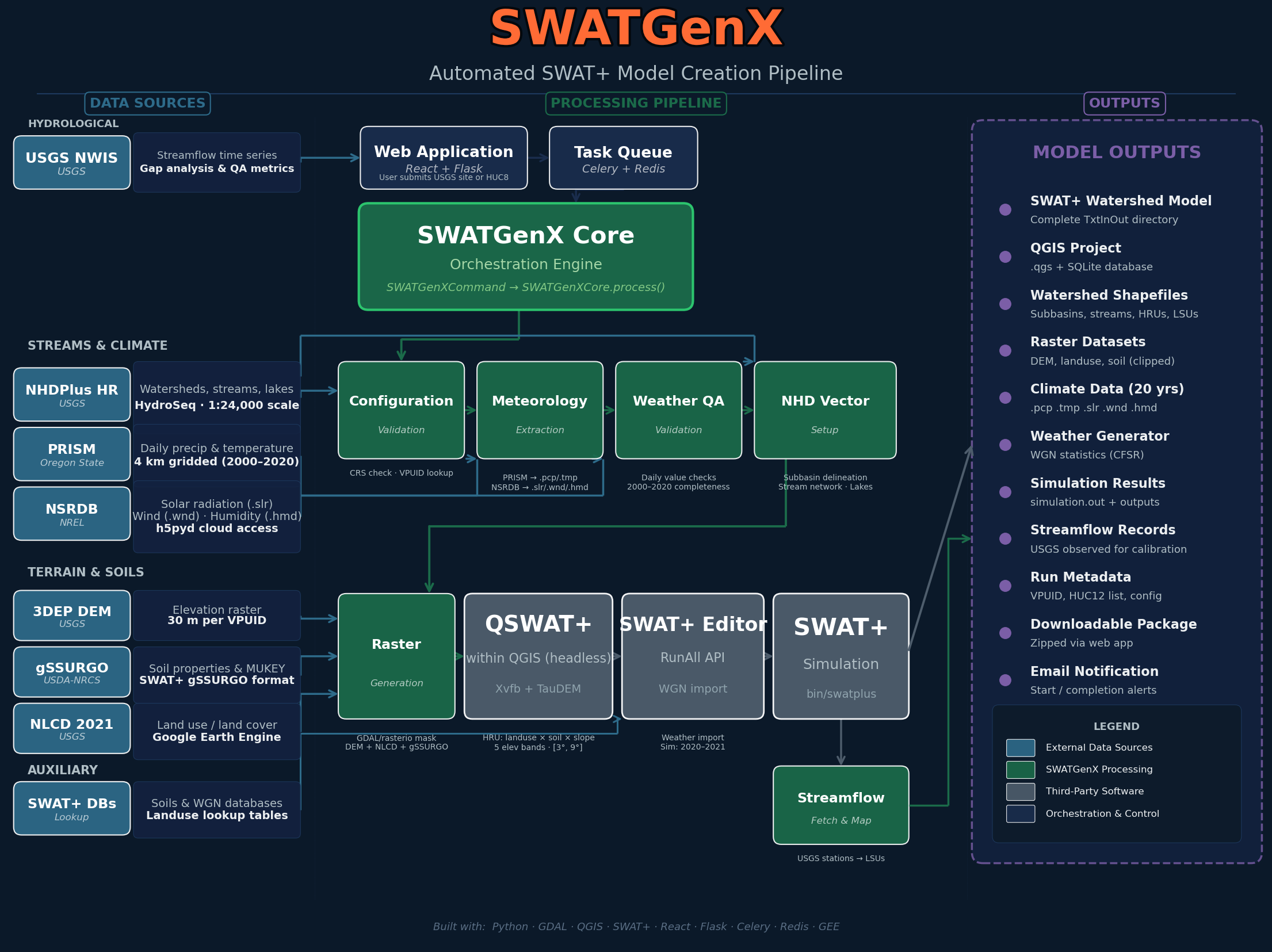
How stewarded national inputs move through automated processing into reports, intelligence outputs, and SWAT+ builds — the same checkpoints (shapefiles, climate, simulation.out) enforced in the pipeline.
What SWATGenX does not claim
SWATGenX does not claim that every generated model is automatically calibrated, validated, or ready for regulatory use.
Treat a generated SWAT+ package as a model-ready starting point: review the watershed, inspect inputs, calibrate where needed, validate against observations, and adjust management assumptions for your study purpose.
The value is starting from a consistent, inspectable SWAT+ package instead of rebuilding the GIS and data pipeline from scratch.
Skip the most fragile part of SWAT+ setup
Use SWATGenX to select a U.S. watershed, generate a SWAT+ model package, inspect the delivered files, and continue with calibration or scenario development.
What SWATGenX delivers is an uncalibrated model: it ranks and localises where to look and scopes the problem — triage, not design certification. Calibrate against observations before relying on the magnitudes it reports.
Related guides
These pages are written for people hitting friction in desktop SWAT+ / QSWAT+ workflows — linked from methodology and SWAT+ model generation so they are crawlable, not orphaned.
Try SWATGenX
Next steps
Last updated: 2026-05-01. For dataset stewardship and preprocessing detail, see methodology.